Sprint Action Center
Action Center is a single-sprint "what do I need to do" feed — pick a project and a sprint, and it pulls together automated risk signals, critical bugs, your own assigned issues, and anything waiting on your input into one ranked list. It's read-only: nothing here can be dismissed, snoozed, or marked resolved from this page.
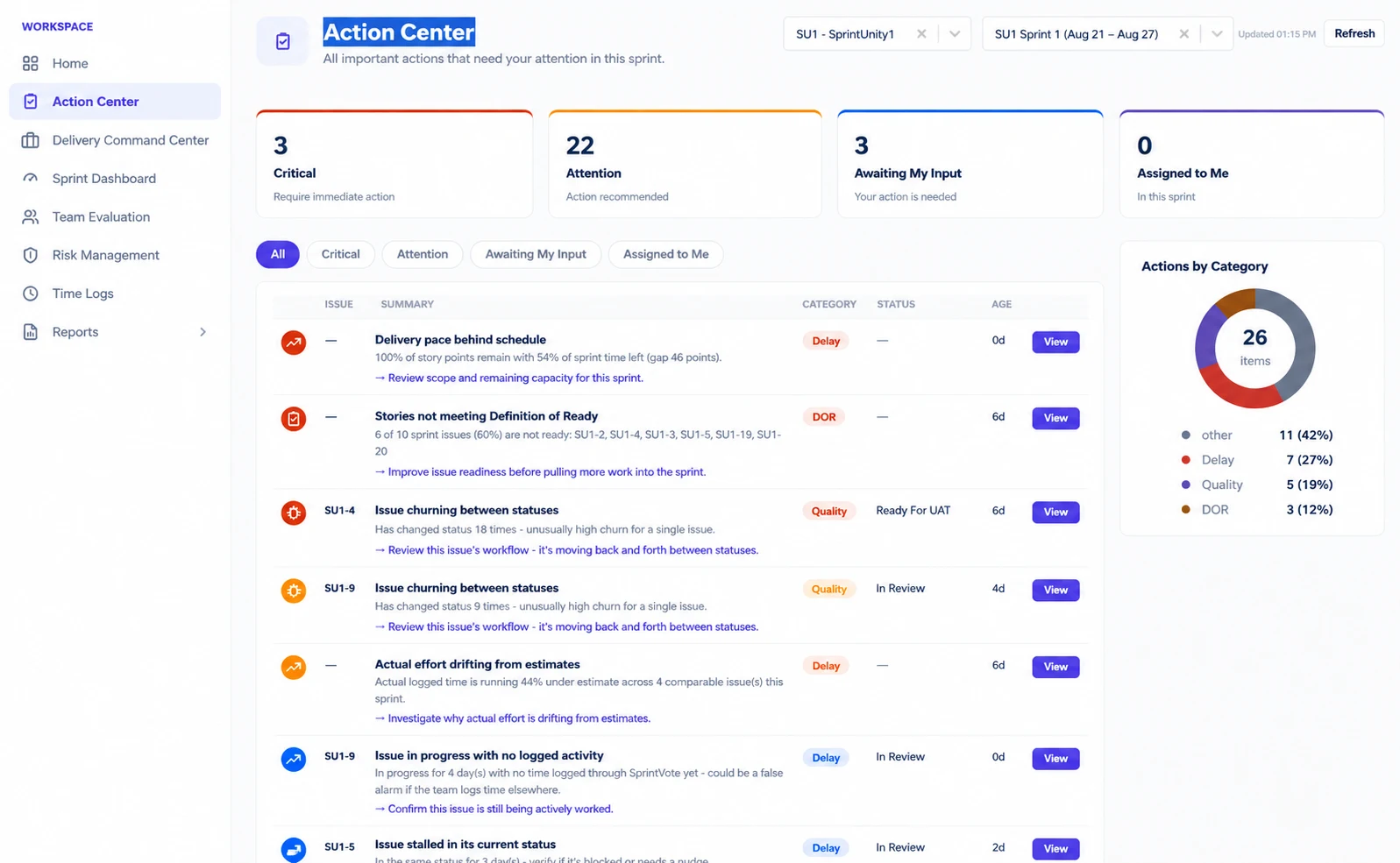
Where the four counts actually come from
Critical & Attention
Built from two sources: every open sprint_risks row for this sprint (both the sprint-wide rules and the seven issue-level rules Risk Management already computes — capacity, delivery, bus factor, estimation drift, quality rework, blocked share, and more) plus Critical Bugs (issues of type Bug, Highest priority, still unresolved — the same definition Delivery Command Center uses). A row counts as Critical if its severity is "critical," and Attention if its severity is "high" or "medium."
Awaiting My Input
Two things added together: open risks whose owner_account_id is you, plus evaluation periods currently pending your score (the same query Home's action items use). A risk you're the named owner of shows up here even if nobody else would see it as urgent.
Assigned to Me
Every not-yet-done issue in this sprint where you're the Jira assignee — read straight from the same issue list Sprint Dashboard already fetches for this sprint, filtered by your account ID. No separate Jira call.
SUSTAINED_BLOCKED_SHARE_RISK row always reads "Escalate blockers — a large share of this sprint's issues are stuck," regardless of which sprint it's on. There are 17 such rule-to-recommendation mappings in total (10 sprint-level, 7 issue-level); Critical Bugs get a fixed "Investigate and fix before the sprint closes."The five tabs
All / Critical / Attention / Awaiting My Input / Assigned to Me — the last two switch to a different, purpose-built list rather than filtering the same table:
| Tab | What it actually shows |
|---|---|
| All | Every open risk-based item plus Critical Bugs, unfiltered |
| Critical | Same list, filtered to severity === "critical" |
| Attention | Same list, filtered to severity === "high" or "medium" |
| Awaiting My Input | A separate view: risks you own, plus a single row for "N evaluations awaiting your score" if any are pending |
| Assigned to Me | A separate table of your own not-done issues in this sprint (Issue, Summary, Status only — no category or age columns, since these aren't risk rows) |
Each row in the main table shows Issue key, Summary, Category (Capacity/Delay/DOR/Quality/Dependency, color-coded), Status, Age in days since the signal was detected, and a View button that jumps straight to where you'd actually act on it — Risk Management, Sprint Capacity, Issue DOR, or Sprint Dashboard, depending on the category.
Actions by Category
A donut chart totalling every open item (risk rows + Critical Bugs) by category — Capacity, Delivery, Quality, Dependency, DOR — using the exact same category taxonomy and colors Risk Management uses per sprint. It's the fastest way to see whether this sprint's pressure is mostly about readiness, delivery pace, or something else, before reading the list row by row.
What's deliberately left out, and why
- No "Resolved" bucket, no dismiss or snooze action — the whole page is read-only, same as Home and Delivery Command Center. Resolving an item means resolving the underlying risk in Risk Management itself, not clearing a checkbox here.
- No fabricated per-issue Estimation Drift or Voting-consensus rows — only signals Risk Management already computes and persists are shown. If a signal doesn't exist yet as a stored risk, it doesn't appear here.
- No QA-specific capacity gap ("QA hours used vs. QA hours configured") — time logs aren't tagged by Dev/QA role today, so that split isn't computable yet.
Magic Wand — 3 panels
Exact explanation text, verbatim from each panel's explainer function:
Action Center Summary
"A read-only roll-up of everything currently open for this sprint: automated risk signals (both sprint-wide and issue-specific), critical bugs, issues assigned to you, and things waiting on your input. Nothing here can be dismissed or marked resolved from this page — resolve the underlying risk in Risk Management instead." Recommends starting with the Critical tab whenever at least one critical item exists.
Action Items
"Every open item for this sprint, in one list: risks Risk Management already detected (sprint-wide and per-issue), plus any open Critical Bugs. Each row's recommended action comes from the same rule that flagged it."
Actions by Category
"Every open action item in this sprint, grouped by category — the same categories Risk Management uses." Reports the total and, when there's a clear leader, which category holds the largest share.
Ask Sprint Advisor about this page
An honest gap, worth stating plainly: Action Center is the one page in SprintUnity with no dedicated Advisor skills yet. There's no entry for it in the suggested-questions catalog, so no quick-question buttons appear here, and it has no custom "Explain this page" text either — asking Advisor to explain this page falls all the way back to the generic default: "I don't have a specific explanation for this page yet, but you can ask about permissions, sprints, or reports elsewhere in the app." Magic Wand (above) is fully built out for this page; the conversational Advisor layer on top of it simply hasn't been wired in yet.
Permissions
Action Center has no permission gate — navConfig.js lists it with permission: null, the same as Home. Anyone who can open the app at all can see it, scoped to whichever projects they already have access to.
How anyone gets value out of this
Rating this page
Anyone reading this documentation can mark whether it answered their question — no permission required. It doesn't change anything in the app; it just helps the SprintUnity team prioritize which pages to improve next.