General Settings
General Settings is a single page, four tabs — Voting, Dashboard, Notifications, and Appearance — where each individual setting is saved and loaded independently, the moment you change it. There's no page-wide "Save All"; every toggle, dropdown, and chip list persists on its own.
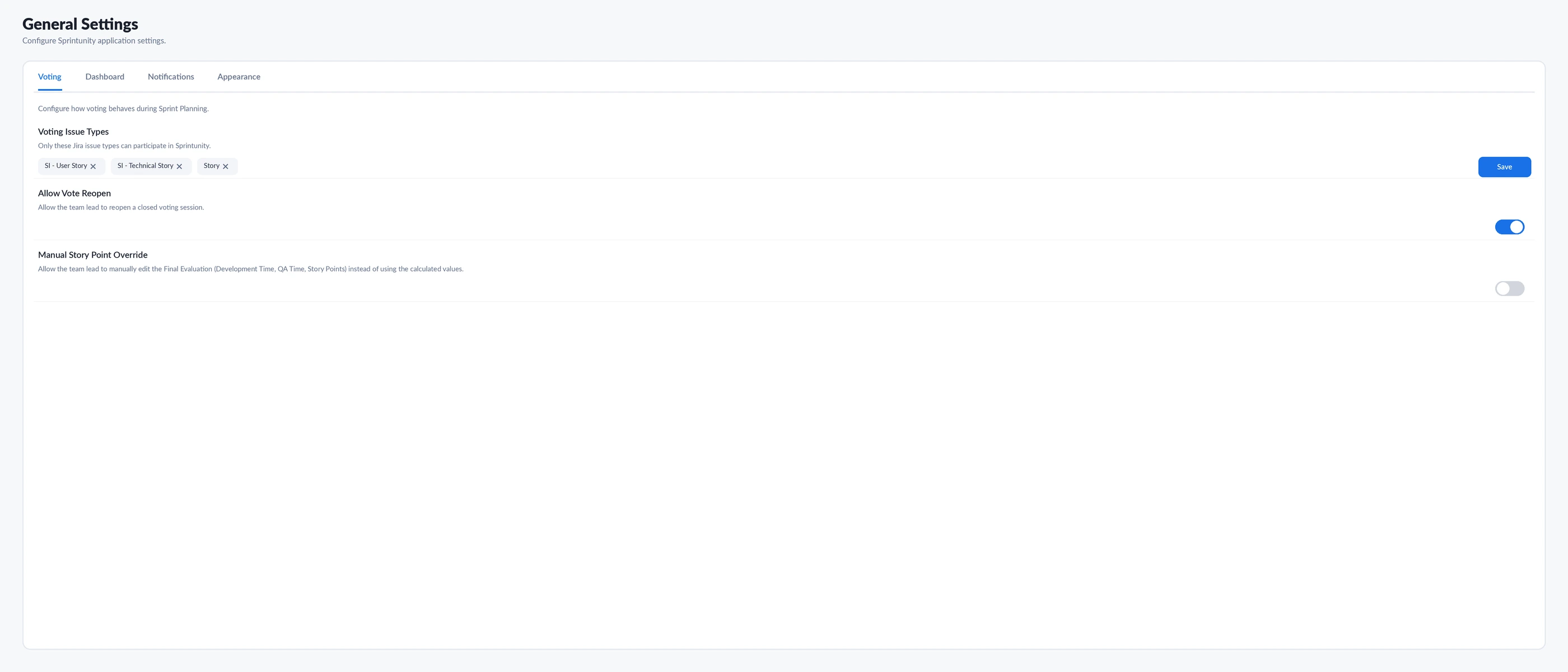
The four tabs, exactly what each one controls
Voting
Voting Issue Types
A multi-select of Jira issue types (e.g. Story, Sub-task). Only issues of the selected types can be brought into a Sprintunity voting session — anything else never appears on the voting screen. Has its own dedicated Save button, gated by Settings.Edit.
Allow Vote Reopen
Toggle. When on, a team lead can reopen a voting session that's already been closed, instead of the result being final the moment it closes.
Manual Story Point Override
Toggle. When on, a team lead can hand-edit the Final Evaluation values — Development Time, QA Time, and Story Points — instead of being locked to whatever the voting calculation produced.
Dashboard
Default Project
Which project the Sprint Dashboard and related pages pre-select when someone opens the app, instead of showing no project selected.
Default Page Size
10, 25, 50, or 100 — how many rows load per page across tables that respect this setting, Action Center included.
Auto Refresh Dashboard + Refresh Interval
Toggle plus a paired 15/30/60/120-second interval. The interval control only matters while auto-refresh is switched on.
Hide After
2, 3, 5, 8, or 10 — labeled in the UI as "time before notifications disappear." See the honest gap below: this value is saved and shown, but nothing in the app currently reads it back.
Notifications
Three recipient roles — Team Leads, Developers, QA Team — each with its own on/off toggle and a short description of who that covers. Admins get an always-on badge that can't be switched off. All three preferences save under one settings row (group: "notifications", name: "recipients").
Notifications.View permission (see the Notification Center page for more on that permission's own gap). Toggling "Developers" off here doesn't hide anything from developers today.Appearance
Default Theme
Light or Dark. Only affects a person's very first visit — once someone has toggled their own theme, their personal choice wins from then on, regardless of what this default says.
Default Helpers
Sprint Advisor, Magic Wand, or Both — which assistant panel(s) are pre-opened for new users. Still requires the viewer to hold Advisor.View; this setting can't grant access to a helper someone isn't otherwise permitted to see.
How saving actually works
Every control on every tab calls the same two functions: getSetting({group, name}) to load its current value on page open, and saveSetting({group, name, value}) the moment it changes (or, for Voting Issue Types, when its own Save button is clicked). There's no shared form state and no single "unsaved changes" banner — each setting commits independently, immediately.
Permissions
| Permission | What it controls |
|---|---|
Settings.View | See the General Settings page and every tab's current values |
Settings.Edit | Change and save any setting on any tab |
There's no per-tab permission split here — unlike Role-Based Access Control's View/Manage pattern per module, General Settings has exactly one Edit permission that covers all four tabs at once.
Magic Wand — one tab-aware panel
A single generalSettings panel that reads which tab is currently active and tailors its explanation to it — Voting, Dashboard, and Notifications each get their own short description; there's no dedicated Appearance description, so that tab falls back to a generic summary.
Ask Sprint Advisor about this page
| Skill | What it actually does | Permission |
|---|---|---|
| Explain this page | General orientation to the four tabs | Settings.View |
settingsOverview | One sentence summarizing the live values: issue type count, whether reopen and manual override are on, current page size, whether auto-refresh is on and its interval, and the Hide After value — in both English and Arabic | Settings.View |
How anyone with access gets value out of this
What's deliberately left out, and why
- Hide After is saved and displayed on the Dashboard tab, but a repository-wide search turns up no other code that reads it back — no timeout, no fade-out, nothing in the notification toast component consumes this value today. It's a real, currently inert setting, not a hidden or broken feature.
- The Notifications tab's recipient toggles are informational only — they don't currently gate who can open the Notification Center. That's still controlled entirely by the
Notifications.Viewpermission. - There's no page-wide undo or settings history — each save is final and immediate, with no confirmation step.
Rating this page
Anyone reading this documentation can mark whether it answered their question — no permission required. It doesn't change anything in the app; it just helps the SprintUnity team prioritize which pages to improve next.